



Understanding Your Needs
When considering the acquisition of a new laptop, it is vital to evaluate your specific requirements and intended usage scenarios. Different tasks necessitate varying levels of functionality and performance, which ultimately influences your purchasing decision. A critical first step is identifying the primary purpose for which you will be using the laptop. For instance, if you are a gamer, you will require a machine equipped with a powerful graphics card, ample RAM, and a high refresh rate display to ensure an optimal gaming experience. Alternatively, for professional work such as graphic design or video editing, a laptop with a robust processor and a high-resolution screen might be essential to handle demanding software applications.
For basic tasks, such as web browsing, email management, and streaming videos, a less powerful machine may suffice. Here, prioritizing an extended battery life and lightweight design may be more significant than sheer processing power. Portability plays a significant role if you carry your laptop frequently or use it on the go; in this case, a slimmer model with a lightweight build could be advantageous.
In addition to performance and portability, assessing battery life is crucial. Depending on your lifestyle, you may need a laptop that lasts throughout the day without frequent recharging. For those who travel or work remotely, longer battery life may be a non-negotiable factor. Additionally, consider the storage capacity, as this could impact your ability to store essential documents or applications. Ultimately, a well-thought-out assessment of these factors will guide you towards selecting a laptop that effectively meets your needs while ensuring satisfactory performance across your intended activities.
Key Specifications to Look For
When considering the purchase of a laptop, understanding the key specifications is crucial for ensuring that your device meets your performance needs. The processor, often referred to as the laptop’s brain, plays a significant role in determining its overall capability. Common processor types include Intel and AMD, with speed measured in gigahertz (GHz). A higher GHz rating indicates a faster processor, which can substantially improve multitasking and application performance, making it a vital specification to evaluate.
Another important specification is the amount of Random Access Memory (RAM). This temporary storage allows your laptop to handle multiple tasks simultaneously. For general use, such as web browsing and document editing, 8GB of RAM may suffice. However, for more intensive tasks like gaming or video editing, opting for at least 16GB is recommended. This will ensure smooth performance without lag, significantly enhancing user experience.
Storage capacity is equally essential, where one may choose between a Hard Disk Drive (HDD) and a Solid State Drive (SSD). While HDDs offer larger storage space at a lower cost, SSDs provide faster data access and improved boot times, which is beneficial for overall system performance. Thus, for those who prioritize speed and efficiency, investing in an SSD may be a wise choice despite the higher price point.
Finally, consider the graphics capabilities of your laptop, particularly if you plan to engage in gaming or graphic design tasks. Integrated graphics may be sufficient for basic usage, while dedicated graphics cards, like those from NVIDIA or AMD, are better suited for graphics-intensive applications. Evaluating these specifications will empower you to select a laptop that aligns with your individual requirements and enhances productivity.
Budgeting and Cost Considerations
When contemplating the purchase of a laptop, the first crucial step is establishing a clear budget. Laptops vary significantly in price, ranging from entry-level models costing a few hundred dollars to high-end machines exceeding several thousand. This wide range necessitates a thoughtful approach to budgeting, which involves assessing your needs and determining how much you are willing to invest. It’s essential to ensure that any budget aligns with the laptop’s intended use, whether for casual browsing, professional tasks, or intensive gaming.
Various factors influence the cost of a laptop. For instance, specifications such as processor speed, RAM size, storage type, and graphics capabilities can substantially affect a laptop’s price. Additionally, brand reputation and design aesthetics play roles in pricing. A well-crafted laptop from a recognized brand may come at a premium but often offers reliability and support that may justify the cost. Conversely, lesser-known brands may provide more budget-friendly options but lack the same assurances.
Finding the right balance between features and affordability is key. Buyers should prioritize specifications that directly correlate with their usage scenarios. For instance, a student might prioritize portability and battery life, while a graphic designer might focus on display quality and processing power. Understanding these requirements can help narrow down options without overspending.
Moreover, it is prudent to keep an eye out for seasonal sales, discounts, or promotions that can significantly reduce costs. Major retail events such as Black Friday, Cyber Monday, or back-to-school sales often showcase considerable savings on laptops. Setting alerts for price drops on your preferred models can also assist in making an informed purchase while remaining within budget. Overall, strategic budgeting and careful consideration can lead to a suitable laptop that meets your needs without breaking the bank.
Researching Brands and Reviews
Before investing in a laptop, it is crucial to conduct thorough research on various brands and models to ensure that your purchase aligns with your needs and expectations. The vast array of options available in the market can be overwhelming; therefore, taking the time to understand the strengths and weaknesses of different manufacturers can help narrow down your choices significantly.
Customer reviews serve as a vital resource in this process. By examining feedback from individuals who have previously purchased and used the laptops in question, prospective buyers can gain insight into the performance, reliability, and overall user experience of specific models. It would be beneficial to focus on reviews that discuss long-term usage and technical support experiences, as these elements can significantly impact satisfaction over time. Comparison websites can also provide a consolidated view of various models, highlighting user ratings, pros and cons, and other relevant information.
Furthermore, understanding the warranty and customer service commitments of a brand is essential. A reputable manufacturer typically offers a solid warranty that covers hardware defects and provides accessible customer support. This commitment not only reflects the brand’s confidence in its products but also ensures that buyers are protected in the event of unforeseen issues. It is advisable to verify the service channels available—be it through phone support, online chat, or physical service centers—so that assistance is readily available should the need arise.
Additionally, seeking recommendations from friends, colleagues, or technology experts can add value to your research. Personal experiences can often highlight strengths or potential pitfalls that generic reviews may overlook. By combining insights from various sources, including online platforms and personal networks, you can build a comprehensive view of the laptop brands and models that may suit your requirements most effectively.
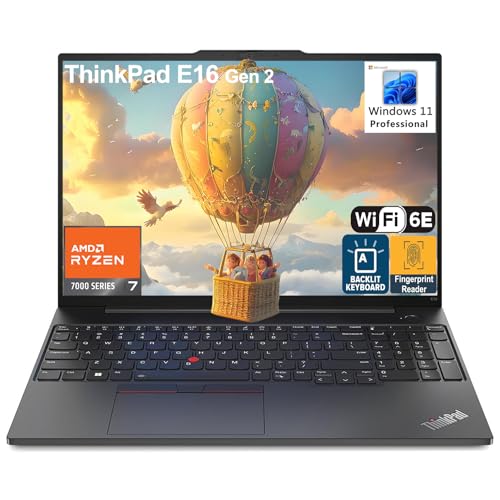
- Sporting a compact and lightweight design, the Lenovo 16″ ThinkPad E16 Gen 2 Laptop enables users to complete their busy…
- 16″ WUXGA (1920×1200) IPS 300nits Non-Touch Anti-glare, 45% NTSC display backed by integrated AMD Radeon 680M Graphics, …
- RAM: 32GB DDR5 SDRAM Memory; Hard Drive: 1TB PCIe NVMe M.2 SSD.
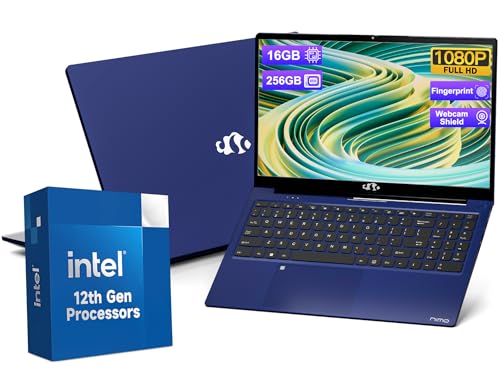
- High Performance: Powered by the 12th Gen Intel Alder Lake-N100 processor with 4 cores and 4 threads, the Nimo laptop de…
- Stunning Display: The Nimo laptop features a 15.6″ Full HD display with vibrant 1080P resolution, an 85% screen-to-body …
- Easy Connectivity: The Nimo laptop offers versatile ports, including USB 3.0 and a full-function Type-C, along with addi…

- 【2-Year Warranty & Reliable Quality】Built to the highest standards, NIMO laptops come with a 2-year warranty and 90-day …
- 【Immersive 15.6” Display | Anti-Glare & Eye-Friendly】Enjoy sharp visuals on a 15.6″ FHD anti-glare screen with an 85% sc…
- 【Smooth Performance | Intel N100 Processor】 Powered by the Intel 12th Gen N100 (4 cores, up to 3.4GHz), NIMO delivers sm…